See It In Action

A Contract Review in Four Steps

Watch how ContractKen reviews a real contract inside Microsoft Word - from opening the document to applying tracked redlines.

Detect Risks, Favorable Terms, Ambiguities & Missing Clauses

ContractKen scans the entire contract and categorizes every finding by type and severity. High-risk issues that deviate from your playbook's walkaway position are surfaced first.

Risks - clauses that deviate from your standards
Favorable - terms already in your favor
Ambiguous - vague language that could create disputes
Missing - clauses your playbook requires but aren't present
ContractKen detecting issues in a contract

Navigate Directly to the Clause in Your Document

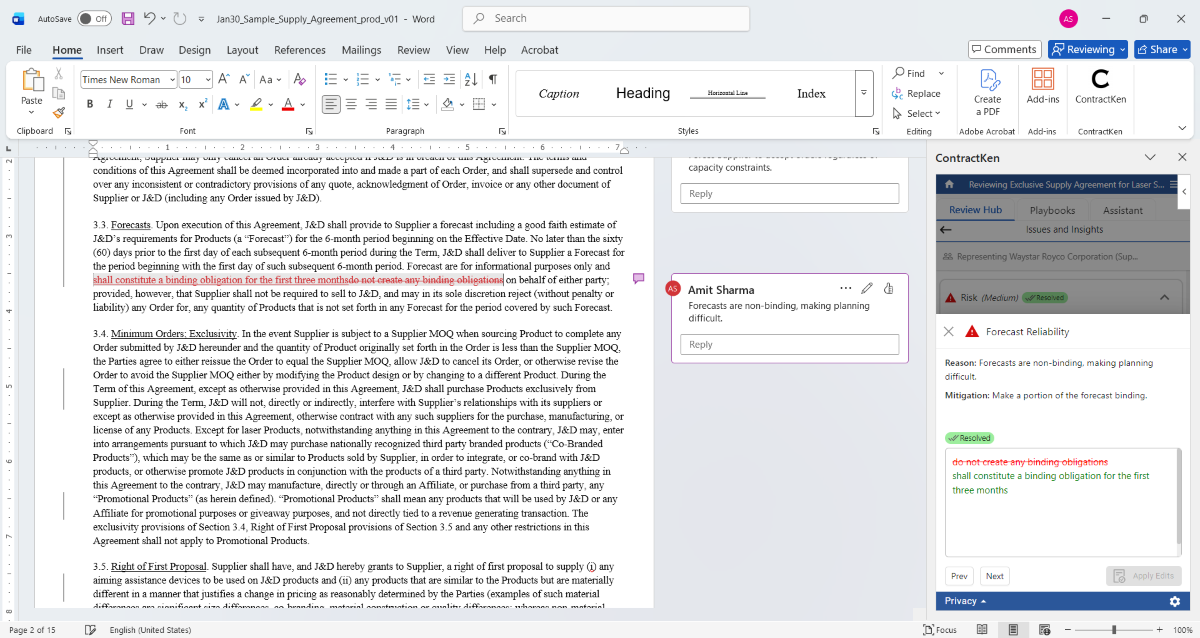
Click any finding and ContractKen jumps to the exact location in your Word document - highlighting the relevant clause with surrounding context. No scrolling through a 60-page contract to find Section 14.3.

Issues are spread throughout the document. Each finding card in the sidebar corresponds to a specific clause location - click one, and the document scrolls and highlights automatically.

ContractKen navigating to specific clause in Word

Understand the Reason and Mitigation Strategy

Each finding expands to show exactly why it's flagged and what to do about it. For playbook reviews, you see which position the clause falls below and the specific deviation.

Indemnification - Below Fallback
Reason: Indemnification scope limited to "negligence" only. Your playbook fallback requires coverage for breach and willful misconduct with reasonable attorneys' fees.
Mitigation: Expand indemnification scope. Suggested redline uses your Clause Library preferred position language.
ContractKen insight detail

Apply Surgical Redlines as Tracked Changes

One click. The redline is applied directly into your Word document as a standard tracked change - exactly as if you'd typed it yourself. An explanatory comment is added alongside for the counterparty.
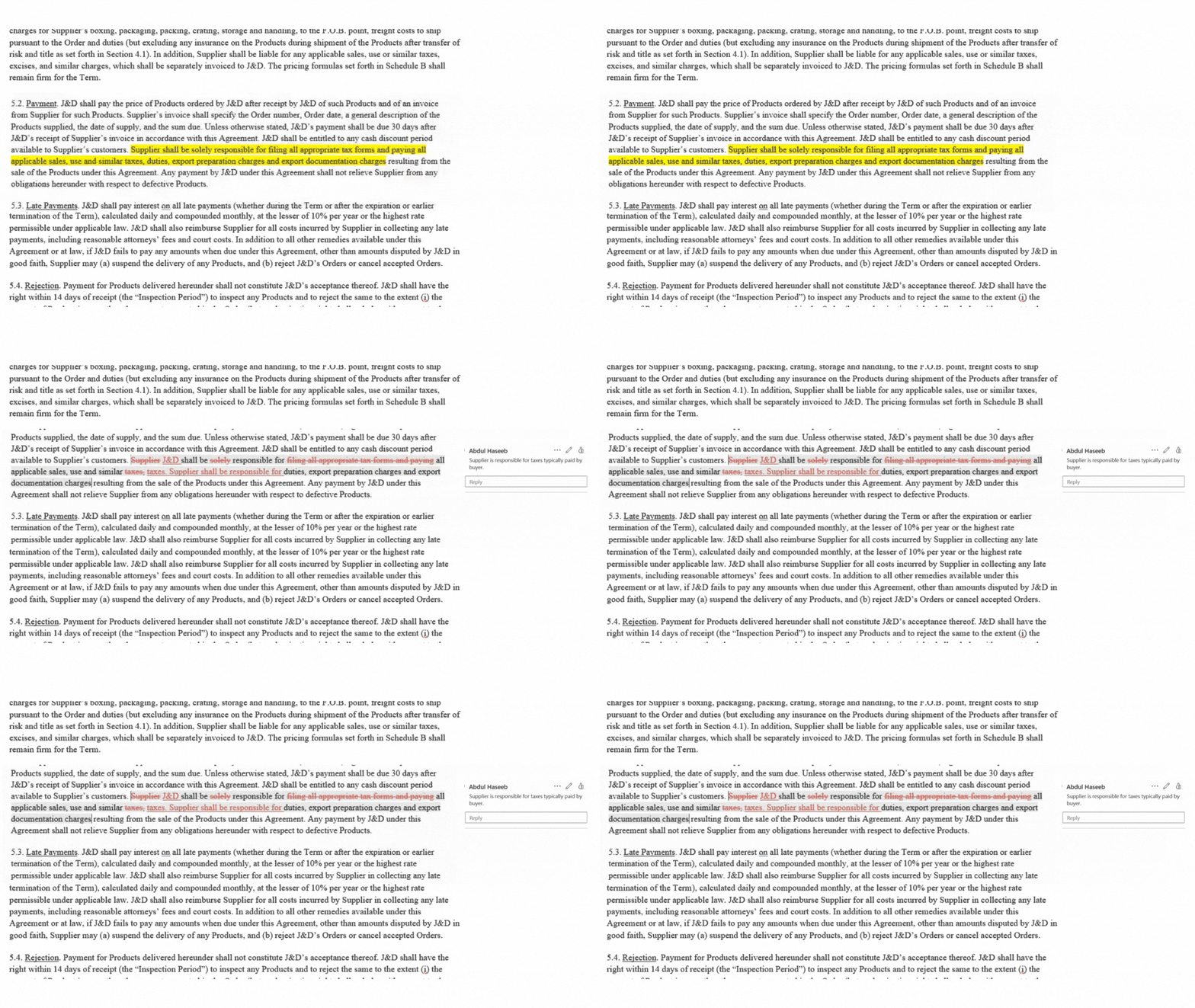
Your counterparty never knows AI was involved. The tracked changes and comments look identical to manual edits. No export. No re-import. No formatting artifacts.
ContractKen applying surgical redlines
The Difference

What ContractKen Catches That Manual Review Misses

This looks like a standard confidentiality clause. Most reviewers would move past it. ContractKen won't.

Looks Standard
8.1 Confidentiality. Each party agrees to hold in confidence all Confidential Information received from the other party. The Receiving Party shall not disclose such Confidential Information to any third party except as expressly permitted herein. 8.2 Residuals. Notwithstanding Section 8.1, either party shall be free to use for any purpose the residuals resulting from access to or work with the Confidential Information, provided that such party shall maintain the confidentiality of the Confidential Information as provided herein. "Residuals" means information in intangible form that is retained in the unaided memories of persons who have had authorized access to the Confidential Information.
A busy reviewer might think: "Standard NDA language - bilateral confidentiality with a residuals clause. Looks fine."

The problem? Section 8.2 effectively guts the entire NDA. The "residuals" carve-out allows the counterparty to use anything they remember from your confidential information - trade secrets, pricing strategy, technical architecture - for any purpose. It's a widely used clause that sophisticated counterparties insert specifically because it looks innocuous.
ContractKen Flags It
8.1 Confidentiality. Each party agrees to hold in confidence all Confidential Information received from the other party. The Receiving Party shall not disclose such Confidential Information to any third party except as expressly permitted herein. 8.2 Residuals. Notwithstanding Section 8.1, either party shall be free to use for any purpose the residuals resulting from access to or work with the Confidential Information, provided that such party shall maintain the confidentiality of the Confidential Information as provided herein. "Residuals" means information in intangible form that is retained in the unaided memories of persons who have had authorized access to the Confidential Information.
ContractKen (Risk - High): Residuals clause allows counterparty to freely use any confidential information retained in memory. This effectively negates the NDA's protections for trade secrets and commercially sensitive information. Your playbook's walkaway position prohibits residuals clauses in technology and IP-heavy agreements.
Suggested action: Delete Section 8.2 entirely (Preferred Position). If counterparty insists, Fallback Position limits residuals to general skills and experience only, excluding trade secrets, product roadmaps, and pricing information.
Privacy By Architecture

Your Contract Text Never Reaches AI Unprotected

Other AI tools ask you to upload contracts to their cloud. ContractKen's Moderation Layer masks party names, dollar amounts, trade secrets, and proprietary terms before any text is processed by AI models.

Built into the architecture. It's architecture.

Learn How the Moderation Layer Works
Your Contract"Acme Corp shall pay $2.5M to GlobalTech..."
Moderation Layer"[PARTY_A] shall pay [AMOUNT] to [PARTY_B]..."
AI AnalysisRisk detection, clause matching, redline generation
Back in Your Word DocFindings with original names restored. Tracked changes ready.
Choose Your Approach

Two Ways to Review

Every contract is different. Your review approach should be too.

Best for: High-volume standardized review

Your Standards, Enforced Automatically

Every clause is checked against your playbook's three positions - preferred, fallback, and walkaway. Deviations are flagged by severity, and corrections are pulled from your clause library.

  • Enforces preferred, fallback, and walkaway positions per clause
  • Flags deviations by severity (deal-breaker vs. acceptable risk)
  • Suggested redlines use your clause library language
  • Every reviewer applies the same standard - no inconsistency
  • Guidance notes explain the "why" behind each position
Playbook-Driven Review
Best for: First-pass review, unfamiliar contracts

Full Risk Analysis, Zero Setup

No playbook needed. ContractKen's 700+ clause knowledge base performs a thorough risk analysis - detecting high-risk terms, favorable language, ambiguities, and missing clauses.

  • Works immediately with no setup or configuration
  • Detects risks, favorable terms, ambiguous language, and missing clauses
  • AI best-practice analysis across all clause types
  • Adjustable risk sensitivity to match your threshold
  • Ideal for new contract types or one-off agreements
Comprehensive Review
Works With Any Contract Type

What ContractKen Catches - By Contract Type

Select a contract type to see the kinds of issues ContractKen identifies.

Common Risks Detected

  • Overbroad definition of "Confidential Information" with no carve-outs
  • No residuals clause (knowledge retained in memory)
  • Non-solicitation bundled into NDA without time limit
  • Asymmetric obligations (only one party is bound)

Commonly Missing Clauses

  • Return or destruction of materials upon termination
  • Permitted disclosures (court order, regulatory requirement)
  • Injunctive relief provision
  • Survival period for confidentiality obligations

Common Risks Detected

  • Unlimited liability with no aggregate cap
  • Auto-renewal with no termination for convenience
  • Broad assignment rights without consent requirements
  • Vendor's limitation of liability set below industry standard

Commonly Missing Clauses

  • SLA with remedies for service failures
  • Data protection addendum / DPA
  • Change of control provision
  • Most favored customer clause

Common Risks Detected

  • Vendor retains broad license to customer data
  • Unilateral right to modify terms or pricing
  • Uptime SLA below 99.5% with weak remedies
  • Data portability limited to proprietary formats

Commonly Missing Clauses

  • Data breach notification timeline and process
  • Exit assistance / transition services
  • Sub-processor notification and approval rights
  • Audit rights for compliance verification

Common Risks Detected

  • Non-compete scope exceeds enforceable limits in target jurisdiction
  • IP assignment clause lacks "work made for hire" language
  • Garden leave provisions without compensation clarity
  • Broad clawback triggers beyond industry norm

Commonly Missing Clauses

  • Prior inventions disclosure schedule
  • Dispute resolution / arbitration clause
  • Return of company property upon termination
  • Data privacy and monitoring acknowledgment

Common Risks Detected

  • Indemnity basket / deductible set above market standard
  • Reps & warranties survival period too short
  • MAC definition missing quantitative thresholds
  • Escrow holdback below market standard for deal size

Commonly Missing Clauses

  • Anti-sandbagging provision
  • No-shop / go-shop window definition
  • Bring-down condition for closing
  • Specific performance remedy provision
Calculate Your ROI

How Much Time Would You Save?

Based on data from legal teams using ContractKen. Adjust the numbers to match your workflow.

90
Hours Saved / Month
$31,500
Value of Time Saved / Month
$378K
Annual Value
How ContractKen Compares

Not All AI Review Tools Are the Same

Here's how ContractKen differs from manual review, generic AI, and upload-to-portal tools.

Manual Review Generic AI (ChatGPT/Claude) Upload-to-Portal Tools ContractKen
Works inside Word × ×
Your playbook enforced Memory-dependent × Some ✓ Auto-enforced
Redlines as tracked changes Manual typing Copy-paste Export required ✓ Native
Confidential text protected × Sent to cloud Policy-based ✓ Moderation Layer
Consistent across reviewers × Varies × Partial ✓ Always
Counterparty sees AI involvement No Often (formatting tells) Often (export artifacts) Never ✓
Speed 2–4 hours ~30 min + heavy editing ~20 min + export/import Minutes ✓

Frequently Asked Questions

ContractKen reviews any commercial contract - NDAs, MSAs, license agreements, supply agreements, employment contracts, lease agreements, M&A documents, and more. The AI adapts to the contract type and applies relevant analysis whether you use Playbook-Driven or Comprehensive Review mode.
Playbook-Driven Review checks every clause against your organization's specific negotiation standards - preferred positions, acceptable fallbacks, and deal-breaker thresholds. Comprehensive Review uses ContractKen's 700+ clause knowledge base to perform a thorough risk analysis without requiring a pre-configured playbook. Many teams use Comprehensive for initial assessment and Playbook for high-volume standardized review.
Yes. ContractKen supports contract review in 100+ languages. The AI analyzes the contract in its original language and can generate findings and redline suggestions in your preferred language.
Yes. Every redline is applied as a standard Microsoft Word tracked change - exactly as if you'd typed it. Your counterparty sees normal tracked changes with no indication AI was involved. No export or re-import needed.
The Moderation Layer masks confidential information - party names, amounts, proprietary terms - before any text reaches AI models. The raw contract text never leaves your environment unprotected. ContractKen confirms that no customer data is ever used for model training.
Yes. In Playbook-Driven Review, you define your own risk thresholds - which deviations are deal-breakers, which are acceptable, and which need escalation. In Comprehensive Review, severity is based on legal best practices but can be adjusted to your preferences.
Three key differences: (1) ContractKen works natively inside Microsoft Word - no uploading to a portal, no exporting/importing redlines. (2) The Moderation Layer protects your contract text by architecture, by design - confidential information is masked before AI processing. (3) Playbook-Driven Review enforces your organization's specific standards (preferred/fallback/walkaway positions), not generic AI suggestions.
Yes. ContractKen supports collaborative review. Multiple team members can review the same contract, and Playbook-Driven Review ensures the same standards are applied regardless of who's reviewing.

ContractKen AI Contract Review is a Microsoft Word add-in that enables legal teams to review third-party contracts against their organization's playbooks and negotiation standards. It detects risks at three severity levels, identifies missing clauses, flags ambiguous language, and generates surgical redline suggestions as standard Word tracked changes. The built-in Moderation Layer masks confidential information before AI processing, ensuring contract text never leaves the user's environment unprotected.